
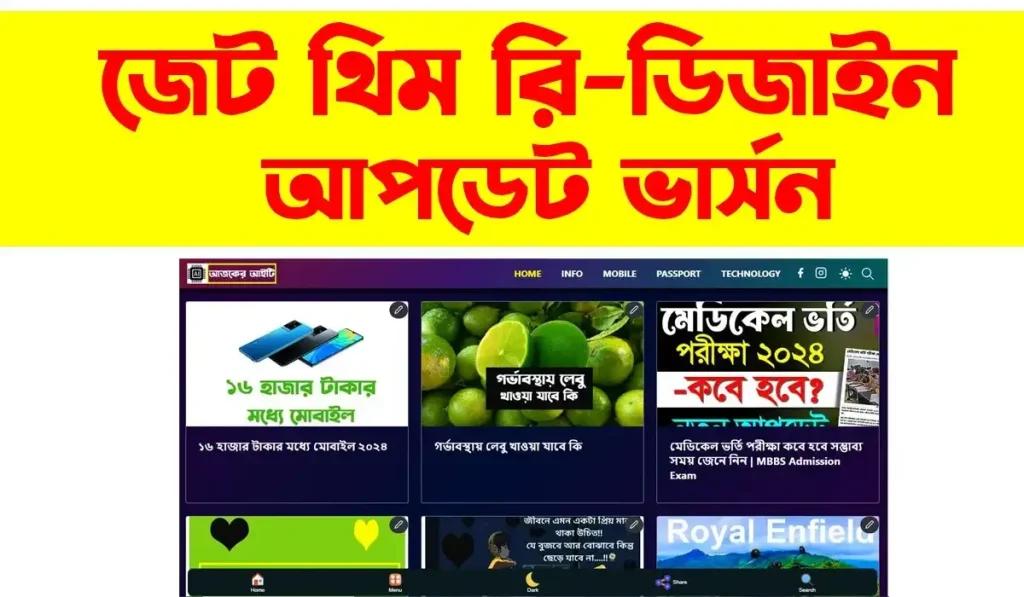
Jettheme Redesign Blogger Template Adsense Approval

Instant Download

100% Original

After Sale Support

Update File
300.00৳ Original price was: 300.00৳ .200.00৳ Current price is: 200.00৳ .
Description
Creating a successful blog on Google’s Blogger platform requires more than just excellent content. In today’s highly competitive digital landscape, user experience, page loading speed, and search engine optimization (SEO) dictate who reaches the top of search engine results pages. If your current blog feels sluggish, looks outdated, or struggles to rank, upgrading your theme is the most effective solution. Enter the highly acclaimed jettheme.
Specifically, the redesigned version of this theme has taken the blogging community by storm. It transforms the traditionally simple Blogger framework into a modern, lightning-fast, and professional content management powerhouse.
In this comprehensive guide, we will explore everything you need to know about this template. From uncovering its premium features to providing a step-by-step installation guide, we will help you understand why securing a Jettheme redesign blogger template download might be the best decision you make for your website this year.
What is the Jettheme Redesign Blogger Template?
Before diving into the technical specifications, it is essential to understand what makes this theme so revolutionary. Jettheme is a premium-quality, highly optimized template built specifically for the Blogspot (Blogger) platform. Unlike standard default templates that come pre-installed on Blogger, this theme is engineered from the ground up with a strict focus on Core Web Vitals, clean typography, and minimalist aesthetics.
The redesign aspect refers to custom modifications made by skilled developers to enhance the original Jettheme structure. These redesigns often introduce modernized user interfaces (UI), improved dark mode functionalities, customized widget areas, and advanced header designs that cater to niche bloggers, news sites, and professional portfolios.
Whether you are running a technology blog, a personal journal, or a high-traffic news aggregator, the redesigned layout adapts seamlessly to your content while maintaining near-perfect performance scores.
Core Features That Make Jettheme Stand Out
When evaluating a new template, website owners must look beyond aesthetics. The true value of a template lies in its underlying code and functionality. Here is a detailed breakdown of the features that make this theme a top-tier choice for professionals.
Lightning-Fast Loading Speeds
Page speed is a confirmed Google ranking factor. A delay of just a few seconds can drastically increase your bounce rate. Jettheme is famously devoid of heavy JavaScript libraries like jQuery, which traditionally bog down Blogger websites. By utilizing vanilla JavaScript and highly compressed CSS, the template achieves exceptional loading times, often scoring a perfect 100/100 on Google PageSpeed Insights and GTmetrix.
Advanced On-Page SEO Optimization
Writing great content is only half the battle; search engines need to be able to crawl and understand your site structure. This template comes with advanced SEO features pre-coded into its framework. It includes optimized breadcrumbs, proper schema markup (rich snippets), and semantic HTML5 tags (like `<article>`, `<header>`, and `<nav>`). These elements ensure that search engines index your pages accurately, giving you a competitive edge in search results.
Fully Responsive and Mobile-First Design
With the majority of global web traffic originating from mobile devices, a responsive design is no longer optional. The redesign ensures that your blog scales flawlessly across all screen sizes—from ultrawide desktop monitors to the smallest smartphones. The mobile menu is intuitive, touch-friendly, and unobtrusive, ensuring a premium reading experience for users on the go.
High-Converting AdSense Friendly Layout
For many bloggers, monetization is the ultimate goal. This template has been strategically designed to maximize ad revenue without compromising the user experience. It features dedicated ad placement slots within the header, between posts, and in the sidebar. These areas are optimized to prevent layout shifts (ensuring a good Cumulative Layout Shift score) while maintaining high visibility for your Google AdSense or alternative ad network banners.
Native Dark Mode Functionality
User preference has shifted heavily toward dark mode interfaces to reduce eye strain and save device battery life. The Jettheme redesign includes a seamless, one-click dark mode toggle. Unlike older themes that rely on bulky external scripts to invert colors, this functionality is deeply integrated into the CSS variables, ensuring a smooth transition without any performance drop.
Comparing Jettheme to Standard Blogger Templates
To truly appreciate the value of this upgrade, it helps to compare it directly with the default templates provided by Blogger.
Feature Category | Default Blogger Templates | Jettheme Redesign
Code Structure | Often bulky and outdated | Minified, clean, HTML5/CSS3 |
Page Speed Score | Average (50 – 70) | Exceptional (90 – 100) |
Schema Markup | Basic or non-existent | Advanced, pre-configured rich snippets |
Ad Placement | Manual, often breaks layout | Strategic, responsive ad slots built-in |
Customizability | Limited layout options | Extensive layout tab with easy drag-and-drop |
Dark Mode | Not available natively | Built-in toggle switch |
Finding the Jettheme Redesign Blogger Template Download
When you are ready to make the switch, finding the right source file is your next step. Because the Blogger community is highly active, many independent developers create their own modifications of the base theme.
When searching for a Jettheme redesign blogger template download, it is crucial to source your files from reputable developers. Downloading themes from unverified third-party sharing sites can expose your blog to malicious code, hidden spam links, or broken scripts that can severely harm your SEO.
One highly regarded variant within the tech community is the Jettheme redesign blogger template ajkerit. Ajkerit is known for providing polished, customized versions of popular themes, tailoring them specifically for modern webmasters who need advanced features out of the box. Opting for a trusted redesign like this ensures you receive a template that has been thoroughly tested for bugs, compatibility issues, and performance bottlenecks.
What to Look for Before Downloading
Version Compatibility: Ensure the template is compatible with the latest updates to the Blogger platform.
Documentation: A quality download will come with a documentation file (usually a PDF or a link to a web page) explaining how to set up specific features.
Support Check if the creator offers updates or a community forum for troubleshooting.
Step-by-Step Guide: How to Install Jettheme on Your Blogger Site
Installing a new theme on Blogger can seem intimidating if you have never handled XML files, but the process is remarkably straightforward. Follow this comprehensive, step-by-step guide to ensure a smooth transition.
Backing Up Your Current Blog
Before making any changes to your site’s appearance, you must create a backup. This ensures that you can restore your blog to its original state if anything goes wrong during the installation.
1. Log in to your Blogger Dashboard.
2. Navigate to the Theme section on the left-hand sidebar.
3. Click on the downward-pointing arrow next to the orange Customize button.
4. Select Backup from the dropdown menu.
5. Click Download, and an XML file containing your current theme will be saved to your computer.
Installing the New Template
Now that your previous design is safe, you can upload your newly acquired jettheme file.
1. Extract the downloaded ZIP file containing the redesign template to your computer. Inside, you will find an XML file (e.g., `Jettheme-Redesign.xml`).
2. Return to the Theme section in your Blogger Dashboard.
3. Click the arrow next to Customize again.
4. This time, select Restore.
5. Click Upload and select the XML file you just extracted.
6. Wait a few moments for Blogger to process the file. A notification will appear saying “Theme restored” once the process is complete.
Note: If you receive an error during the restore process, you can use the manual HTML method. Click the arrow, select Edit HTML, delete all existing code, paste the contents of the XML file (opened via Notepad or a text editor), and click the save icon.
Phase 3: Configuring Mobile Settings
To ensure the template works flawlessly on mobile devices, you need to tell Blogger to use the custom responsive design rather than its default mobile view.
1. In the Theme menu, click the arrow next to Customize.
2. Select Mobile Settings.
3. Choose the Desktop option (Do not select “Mobile”). This instructs Blogger to use the theme’s built-in responsive CSS rather than Blogger’s outdated mobile override.
4. Click Save.
Customizing Your Jettheme Layout
Once the template is installed, you will want to personalize it to match your brand identity. The beauty of the jettheme redesign lies in its highly intuitive Layout tab. You do not need to be a coding expert to make significant visual changes.
Configuring the Header and Logo
Your logo is the cornerstone of your blog’s brand. To update it:
1. Go to the Layout section in the Blogger dashboard.
2. Locate the Header Logo widget and click the edit (pencil) icon.
3. Upload your custom logo image. For the best visual result, use a transparent PNG file. Ensure you check the box that says “Instead of title and description.”
4. Save the widget.
Setting Up the Navigation Menu
A well-structured menu improves site navigation and helps search engines crawl your content efficiently.
1. In the Layout tab, find the Main Menu or Link List widget.
2. Click edit.
3. Add your category names (e.g., Technology, SEO, Lifestyle) and link them to your respective Blogger labels.
4. If the redesign supports dropdown menus, refer to the template’s documentation on how to format the links (usually by adding an underscore `_` before the sub-menu item name).
Managing Sidebar Widgets
While sidebars are excellent for displaying additional information, cluttering them can negatively impact your loading speed. Keep your sidebar clean. We recommend limiting it to:
* A brief “About Me” author box.
* A Search box.
* Popular Posts widget (to increase user time-on-site).
* One optimized ad slot.
Remove unnecessary widgets like standard blog archives or heavily scripted third-party badges, as these slow down performance.
Best Practices for Maximizing Performance
Installing a fast template is only the first step. How you manage your content moving forward will determine whether your blog remains speedy and SEO-friendly. To get the most out of your Jettheme redesign, implement the following best practices:
Optimize All Images Before Uploading
Large, uncompressed image files are the number one cause of slow-loading web pages. Before uploading any image to a blog post, compress it using tools like TinyPNG or Squoosh. Ideally, convert your images to the modern WebP format, which provides superior quality at a fraction of the file size compared to JPEG or PNG.
Utilize Native Lazy Loading
Jettheme generally includes built-in lazy loading for images. This means images only load when the user scrolls down to them, saving initial bandwidth. When writing posts in the HTML view, ensure your images contain the `loading=”lazy”` attribute within the `<img>` tag to guarantee this feature functions correctly.
Keep the Code Clean
Avoid pasting text directly from Microsoft Word or other rich-text editors into your Blogger post editor. Doing so imports hidden formatting code (inline CSS) that bloats your webpage. Always paste text as plain text, or type directly into the Blogger editor, and use the platform’s native formatting tools for H2 and H3 tags.
Troubleshooting Common Installation Issues
Even with a premium template, minor hiccups can occur during setup. Here are the solutions to a few common issues users experience.
The Menu is Not Working on Mobile
If your mobile hamburger menu does not open when clicked, you likely missed Phase 3 of the installation process. Ensure your Mobile Settings in the Theme tab are set to “Desktop” so the template’s custom JavaScript can execute properly.
Post Thumbnails Are Blurry or Missing
This usually happens if your images are hosted on a third-party server rather than uploaded directly through Blogger. Always upload your featured image directly into the post editor. Blogger’s native system resizes these images perfectly for the homepage grid.
The Read More Button Doesn’t Function
If the “Read More” button or automatic post snippet isn’t working, ensure you have an image at the very beginning of your post and a decent amount of text. Additionally, make sure you are not manually inserting page breaks within the post editor that conflict with the theme’s automatic snippet script.
Conclusion
Elevating your Blogger website from an amateur project to a professional digital publication requires the right foundation. The **jettheme** redesign offers an unparalleled combination of aesthetic appeal, blistering speed, and robust SEO capabilities. By moving away from outdated, heavy templates and embracing modern web standards, you position your content to rank higher, load faster, and convert visitors more effectively.
Whether you are opting for a standard version or specifically seeking the Jettheme redesign blogger template ajkerit for enhanced modifications, the upgrade process is straightforward and highly rewarding. Take the time to follow the installation steps carefully, configure your layout to match your brand, and commit to best practices regarding image optimization.
Are you ready to transform your blog? Secure your Jettheme redesign blogger template download today, run a before-and-after speed test on PageSpeed Insights, and prepare to be amazed by the results. Don’t let an outdated design hold your content back any longer!
Frequently Asked Questions (FAQ)
Is the Jettheme redesign blogger template free to use?
There are typically both free and premium versions available. The free versions are fully functional but may lack some advanced customization features or require you to keep the designer’s credit link in the footer. Premium versions offer unlimited customization, lifetime updates, and the ability to remove footer credits.
Will changing my template to Jettheme affect my SEO rankings?
Changing your template will not delete your content or change your URLs, so your core SEO remains intact. In fact, because Jettheme is highly optimized for speed and includes advanced schema markup, most users see a positive boost in their search engine rankings shortly after upgrading.
3. Does Jettheme support Google AdSense Auto Ads?
Yes, the template is highly AdSense friendly. It is designed to integrate seamlessly with Google AdSense, including Auto Ads. The code is structured to ensure that ads injected by Google do not break the layout or cause severe Cumulative Layout Shifts (CLS), which protects your Core Web Vitals score.
How do I remove the footer copyright text in Jettheme?
If you are using the free version, attempting to remove the footer credit may result in your site redirecting to the creator’s page, as the code is encrypted to protect the developer’s work. To legally and safely remove or change the footer copyright to your own brand, you should purchase the premium version of the template from the original developer.
Can I use Jettheme for an e-commerce or portfolio site?
While Jettheme is primarily designed for content-heavy sites like blogs, news portals, and magazines, its clean, minimalist layout is versatile. You can certainly use it for a portfolio site to showcase projects. However, for full e-commerce functionality (like a shopping cart and checkout), Blogger is generally not the ideal platform, though you can integrate third-party buy buttons within Jettheme posts.
Related Products
2,000.00৳ Original price was: 2,000.00৳ .1,500.00৳ Current price is: 1,500.00৳ .
500.00৳ Original price was: 500.00৳ .400.00৳ Current price is: 400.00৳ .
600.00৳ Original price was: 600.00৳ .500.00৳ Current price is: 500.00৳ .
Reviews
There are no reviews yet.